Every JamesOS release, newest first, and what changed in each one.
UpdateBuild 3124FM-1 and SMK-37 family
JamesOS 1.0b, build 3124
Fuller chords with Polyphony, long releases that ring out, and a quicker way home on SMK-37 family keyboards.
Build 3124 installs over 1.0b builds 3110, 3120, 3122 and 3123. Projects, sounds and settings carry over.
Sound
Chords with Polyphony on are fuller and louder, and still clean. The voices of a chord now add up with more room, and only the loudest peaks are rounded off gently, as on an analog polysynth. Chords of four or more notes no longer drop in level.
Polyphony now switches on straight away while a long release is still ringing. The old tail fades out in a few milliseconds first.
Long amp releases play out in full. On the three FM BANK engines the amp RELEASE now sets the tail, where the engine's own envelope used to cut it short. With Polyphony on, a voice with a long release no longer stops after three seconds.
Screens
When the arpeggiator is on, the ARP page shows an ARP: ON badge, like the POLY badge on HOME.
SMK-37 family keyboards
KNOB BANK returns to HOME from every page and menu, the SOUNDS list included. On the SOUNDS list it no longer jumps to the next category.
On the step grid of a synth track, hold a step pad and play a key to set that step's note.
Clean chords with Polyphony, and the 396 MHz clock for SMK-37 family keyboards.
Build 3123 installs over 1.0b builds 3110, 3120 and 3122. Projects, sounds and settings carry over.
Fixes
Polyphony no longer crackles on loud chords. The voices of a chord are mixed without clipping, and the mix is brought down smoothly when it gets too loud.
With Polyphony on, the master limiter no longer works hard on every chord, so chords keep their tone.
After an update that was refused or did not finish, the screen now returns to the instrument after two seconds.
SMK-37 family keyboards
Installing JamesOS-K from the original firmware now also sets the 396 MHz clock profile, the same profile the FM-1 uses. At that speed JamesOS-K sets the keyboard's power the way the original firmware does. The installer asks you to confirm before it starts.
This works on the SMK-37 Pro, the SMK-37 Elite, the Donner Starrykey 37 Play and the EROK MKE-P37.
A keyboard already running JamesOS-K can move to the 396 MHz clock profile too. Update it to build 3123 first, then connect it again and choose Set the 396 MHz clock profile. A keyboard that already has it is left unchanged.
JamesOS-K is new. Feedback welcome.
Sound
Loud chords with Polyphony on are a little quieter than before at their peaks, and clean. A single note sounds the same.
Steadier audio on busy projects, cleaner drum kits and a lighter load on the processor.
Build 3110 installs over 1.0b build 3083. Projects, sounds and settings carry over.
Fixes
Audio no longer breaks up and stays broken on a busy project. Before, one late block of audio could leave the FM-1 running on half its processing power until it was restarted. This was most likely while turning the global filter.
Drum kits no longer click when a muted lane is hit while another drum is ringing.
Drum kits no longer dip for an instant on every hit. A kick's tail now rings through the hats and snare played over it.
Lighter and faster
The global filter costs much less while it is being turned.
The track filters are lighter, and a silent track skips its filter.
The hi-hat, snare and kick models, the oscillator models, Wavetable, the FM banks, Chip Chord, Wavefolder and Wave Terrain all do less work for the same sound.
An idle FM-1 uses about a quarter less processing than before.
After playback stops, the engines and effect tails finish sooner once nothing more can be heard.
With more headroom, the screen keeps up better while a busy project plays.
Screen
Turning the global filter no longer repeats a message on every step. The value is announced once, after the knob stops.
Selecting another track on the mixer redraws only what changed.
Sound
Kit patterns sound slightly different where one drum plays over another, because the dip is gone. On some engines the first samples of a note played after a short rest can differ from before. The tone and level are the same.
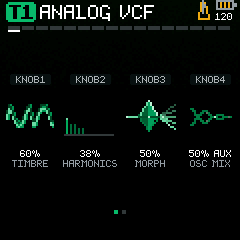
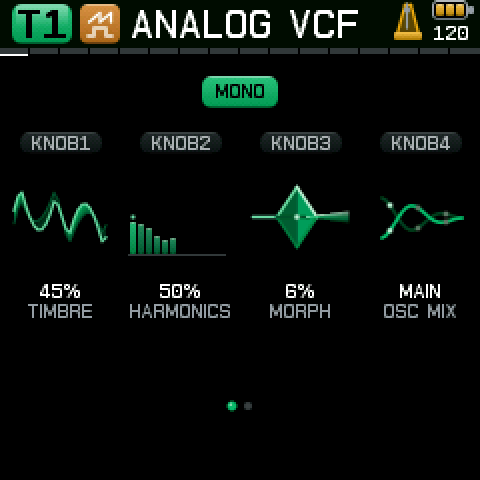
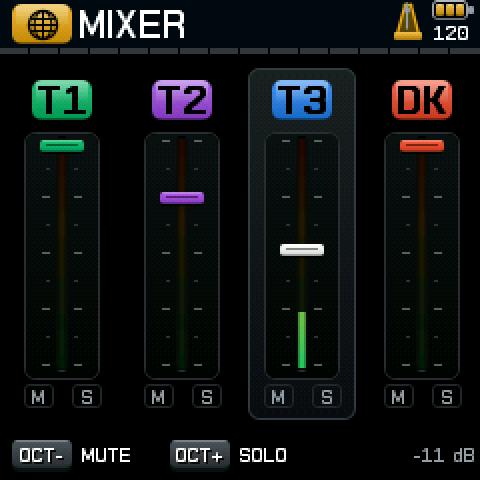
The display now uses its full detail. Text is smooth, and every control has its own picture that shows the setting: the waveform, the filter curve, the echoes, the reverb tail.
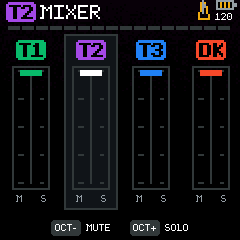
HOME in 1.0aHOME in 1.0bMIXER in 1.0aMIXER in 1.0b
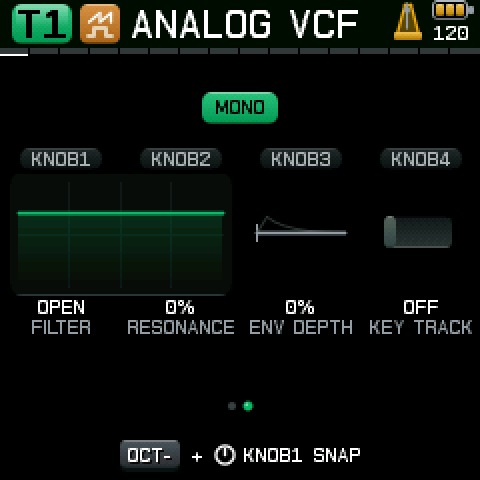
The header shows the engine icon beside the sound name. Filters, envelopes and the compressor are drawn as curves you can read while you turn.
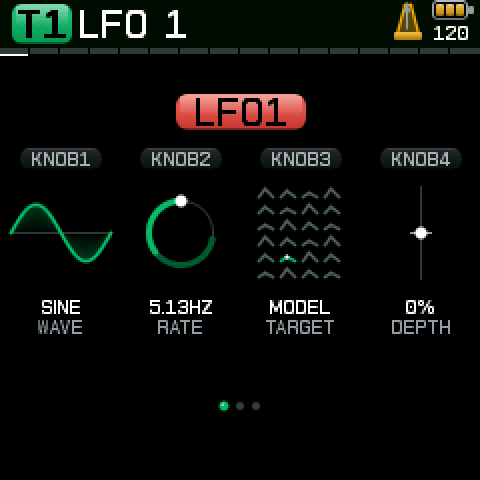
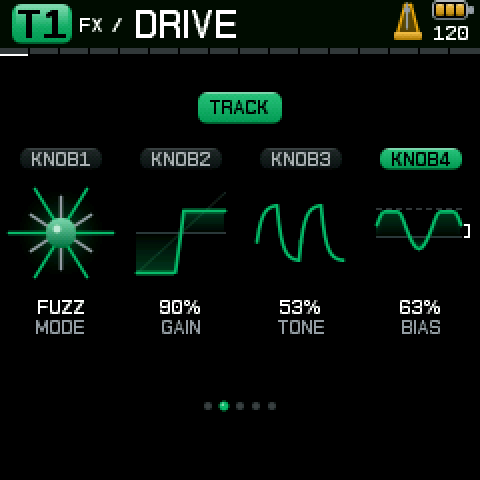
Track filterLFOFX DRIVEARRANGER
Songs
Put your patterns in order with the new arranger. A song holds up to 64 blocks, each 1 to 16 bars, and it is saved with your project.
More to play
128 starting sounds, up from 64. Polyphony on the synth tracks, with 3 to 8 voices depending on the engine.
A rebuilt sound path
New filters, a new shared reverb and a master limiter. Every effect page has a fourth control, and delay and reverb pre-delay can follow the tempo.
JamesOS-K
The same firmware, now on the SMK-37 Pro, with its own manual. It is new, and feedback is welcome.
Be aware before you update
Projects saved with 1.0a show as OLD FORMAT and need converting in the Editor. Updating does not erase them. The steps are under Before you update in the release notes below.
Full release notesEvery change from 1.0a to 1.0b, build 3083.
How to update
Open the installer at /JamesOS/install in Chrome or Edge on a desktop computer.
Connect the instrument with a USB data cable.
Follow the steps on screen.
Keep the instrument connected until it restarts.
An interrupted update can leave the instrument unresponsive.
Before you update
Be aware that projects saved with 1.0a do not load directly in 1.0b. They show as OLD FORMAT.
Updating does not erase projects saved with 1.0a.
If you save over a slot that shows OLD FORMAT, the old project is replaced.
What to do:
Save any work you want to keep into a named slot before you update. The unsaved live session cannot be converted.
Keep your own backup.
After updating, open the Editor, pick the old project and download its original. Keep that file.
Use the Editor's upgrade action and read what it tells you. Import the result into an empty slot you choose.
Listen to the result. Keep the original until you are happy.
Conversion can approximate some settings or refuse a project. It does not promise the same sound.
The mix, filter, reverb and delay behave differently from 1.0a, so a converted project can sound a little different.
Projects saved by 1.0b cannot be opened by 1.0a.
Switching firmware can overwrite another firmware's saved data. Back up first.
Interface
Added a picture for every control. Each one shows the setting: the waveform, the filter curve, the envelope, the echoes or the reverb tail.
Added a new typeface. Text is smoother and easier to read.
The header now shows the engine icon beside the sound name, on both HOME pages.
Added charts for the filters, the envelopes and the compressor, drawn as curves you can read while you turn.
Faders and level meters in the mixer are now larger.
The selected level in the mixer now shows in dB.
The display now redraws only what changed.
Removed the old interface. Both products now use the new one.
Removed a doubled line at the bottom of large charts.
The PATCH AMOUNT control now uses the same slider as LFO DEPTH.
The KEY TRACK switch now uses the track colour when it is on.
If the processor is overloaded while you play, the CPU monitor now turns on and shows CPU USAGE HIGH. MONITOR ENABLED. once per session.
A screen reader can now read page names, selected items, values and messages over USB MIDI. Open the FM-1 Screen Reader page in Chrome or Edge and choose Connect.
Song arranger
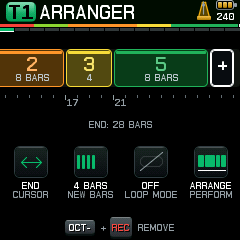
Added a song arranger. Put patterns in order to make a song.
A song holds up to 64 blocks, and each block is 1 to 16 bars.
The arrangement is saved with your project.
You can now set the song to stop or loop at its end.
You can switch back to pattern mode at any time to play live.
BARS now lights one to four slots, and adds a plus for longer blocks.
LOOP MODE now shows a closed loop when on and a struck-through loop when off.
PERFORM now shows a single block for pattern mode and a row of blocks for arrange mode.
Polyphony
Added polyphony on the synth tracks.
With playback stopped, press OCT- and PLAY on HOME to turn on polyphonic play for the selected synth track.
The number of voices depends on the engine, from 3 to 8.
While polyphony is on, the other tracks are not available. Their sounds and patterns are kept.
Normal multitrack play returns when you start the sequencer.
With some engines, the punch ECHO effect is not available while polyphony is on. The screen shows ECHO UNAVAILABLE IN POLY.
JamesOS-K has polyphony too, with the same gesture.
Sounds
The sound list now has 128 starting sounds, up from 64.
The first 32 are favourites. The rest are grouped as bass, leads, keys, pads, arps and more.
The 80S and 90S drum kits are now made with Plaits percussion. They sound different from the old sampled kits.
A project that used an old kit loads with the new one and shows a short message.
Added a deep menu on HOME with voice controls: portamento time, glide mode, amplitude mode and, in LPG mode, a timed gate. Press OCT- with HOME to open it.
Effects
Added a fourth control to each effect page, each with its own picture.
The fourth controls are BIAS on DRIVE, TONE on DELAY, FEEDBACK on MODULATION and PRE DELAY on REVERB.
Wet amount stays on FX SENDS.
Delay time now has 16 note values, from 1/32T to 1 BAR. T marks a triplet and D a dotted value.
Reverb pre-delay can now follow the tempo. Choose AUTO, or a note value from 1/64T to 1/8.
The shared reverb now has a new engine, with ROOM, HALL and SPACE.
The modulation RATE control now uses the same turning ring as the LFO.
Mix and master
Added a master limiter with a soft knee at the end of the mix.
LEVEL controls now follow a new curve, with finer control at low levels.
PAN now keeps the same loudness across the stereo field.
Delay feedback now has a wider range.
Delay repeats now saturate gently instead of running away.
Modulation and filters
Each track, including the drum kit, now has two patches for routing modulation.
Added a global LFO, shared across the instrument. It can be a source in track patches.
Added MODEL as an LFO target on Plaits synth tracks. It changes the engine in steps, so fast settings can click.
Added Random per Note, which picks one new value for each note and holds it.
Added a four-pole ladder low-pass filter and a new high-pass filter.
The filter control now runs from low-pass through open to high-pass, and modulation can sweep through the open point.
On GLOBAL, FILTER, hold OCT- and turn knob 1 to snap between low-pass, OPEN and high-pass.
On GLOBAL, PAN, the same gesture snaps to 100% left, centre and 100% right.
Sequencer
When a pattern is longer than 16 steps, the cue at the bottom of the sequencer screen switches every 3 seconds between SHIFT NOTES and STEP BANK.
The song position now shows above the step strip.
Projects and saving
Saving and INIT now work with REC armed. REC is paused for the save and restored afterwards.
The browser Editor can now export a saved project to a file, and import a project into a slot you choose.
The Editor works on saved slots, and supports the FM-1 only for now.
Older projects are listed as OLD FORMAT and cannot be loaded. See Before you update.
JamesOS-K for the SMK-37 Pro
JamesOS-K brings the same sounds and workflow to the SMK-37 Pro.
JamesOS-K is a separate package. FM-1 and SMK-37 Pro packages are not interchangeable.
The Editor does not support the SMK-37 Pro yet.
Button layout:
KNOB BANK is HOME. On the sound list, it moves to the next category.
PATCH opens the sound and kit list. Hold it for 0.8 seconds to turn HOLD on or off.
SCALE is the LFO button.
CHORD is EDIT, with PATCH 1 and PATCH 2.
NOTE REPEAT opens RETRIGGER on the drum track. On synth tracks it is the punch shift key.
Hold ARP for 0.8 seconds to turn the arpeggiator on or off. On the drum track, the ARP page says SWITCH TO T1 T2 T3.
FADER BANK opens the mixer page for its bank: MIXER for the tracks, KIT LEVEL for the drum lanes. Moving a fader on any other page shows a short mixer view.
GLOBE cycles PAN, FILTER, HEAT, COMPRESSOR and COMP TIME.
Fader link lets fader 1 set two channels together: T1 and T2 on the track bank, lanes 1 and 2 on the drum bank. Hold NOTE REPEAT and SCALE for 0.8 seconds to turn it on or off.
Bug fixes
The first HALL reverb tail was wrong after switching from ROOM.
A note recorded during a pass was played again in the same pass.
Step recording while stopped did not move the cursor on.
PLAY did not act as the transport key while a step was held.
Known issues
With external clock, JamesOS can join two to three beats late if a master starts clock and playback together.
Tracks with different step rates can drift at some tempos: about 35 ms over 64 bars at 133 BPM, and none at 60, 120 or 240 BPM.
Drum retrigger repeats can land up to 4.9 ms early.
When several silent synth tracks start a note at the same moment, their starts are spread by 5.8 and 11.6 ms. This is by design.
Files
Builds: FM-1 FM-1_9673083, SMK-37 Pro SMK-37 Pro_9653083. SHA-256:
Meet JamesOS. It turns the FM-1 into a seven-track groovebox, and 1.0a is out now.
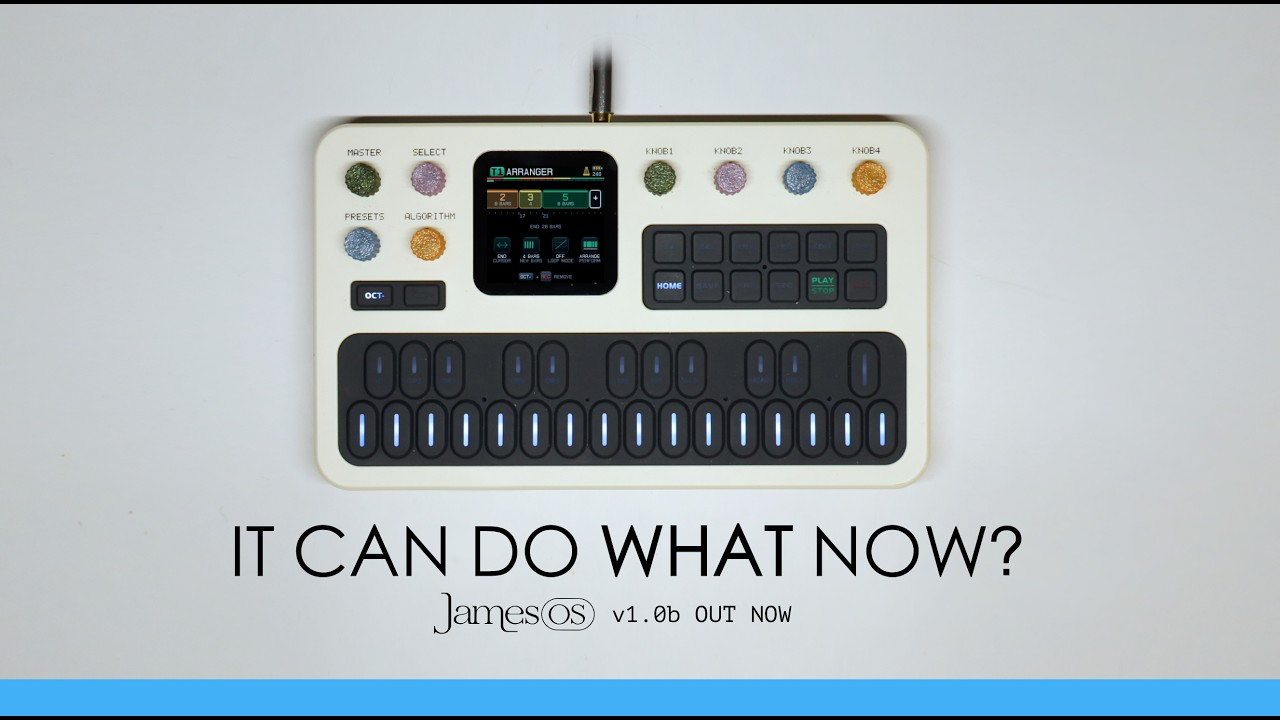
JamesOS is new firmware for the M-VAVE FM-1. It gives you three synth tracks, four drum lanes, a sequencer, effects and a mixer, all on the instrument.
It is free and open source. JamesOS is an independent project by Aaron Grando (James Os) and Gjelly. M-VAVE does not make or endorse it.
The first release, 1.0a, is an alpha. It is ready to play now, and it will keep changing.
Three synth tracks
Each synth track can use any of 24 Plaits engines. Each has its own sound, envelopes, two LFOs and modulation routes. There are 64 starting sounds to begin from.
A four-lane drum kit
Choose the BRAIDS, PLAITS, 80S or 90S kit. Each lane has three voice choices. There are 12 drum-kit starting points.
Sequence it
Every track has a 64-step sequencer, in four banks of 16. Set the note, length, velocity, timing and a condition for each step. The synth tracks also have an arpeggiator, and drum hits have retriggers.
Shape the sound and mix
Each track has its own effects: drive, delay and modulation. All four tracks also feed one shared reverb. A master section adds a filter, pan, heat and a compressor.
Play it
JamesOS is built to feel good to play. Every page puts four controls under the four knobs, with a picture for each one. The keyboard plays notes, enters steps and triggers punch effects. Track colours tell you where you are.
Punch-in effects act on the finished mix. The quick start takes you from a first sound to a first beat in five steps.
Save your work
There are 12 project slots for your own work.
Install it
Back up anything on your FM-1 that you want to keep.
Open the installer in Chrome or Edge on a desktop computer.
Connect the FM-1 with a USB data cable and follow the steps.
The smoothest start is from M-VAVE's original V15 firmware. V16 also works.
JamesOS is free to install. If it earns a place in your setup, you can pay what you want. Contributions help fund the next release.
Before you install
Be aware of the following.
This is an alpha. Installing unofficial firmware may void your warranty.
Switching firmware can overwrite data saved by another firmware. JamesOS does not convert projects from other firmware. Back up first.
An interrupted installation can leave the FM-1 unresponsive. Keep it connected until it restarts.
JamesOS builds on Dinghy by zvenson and on Felucca by Leo Kuroshita and Hügelton Instruments, with SLOOP contributions by isod89. The synth engines are Plaits and Braids by Emilie Gillet of Mutable Instruments, used under their MIT licences. Thank you to all of them. See the licences page for the full notices.
Have fun with it. If you try it, I would love to hear how it goes.